
Your back screams at 3 PM. Your neck feels like someone poured cement into it. You drag yourself off the chair and think, “there has to be a better way to work without throwing my current desk into the garbage.” That exact frustration is what pushed me down the rabbit hole of figuring out what is a riser desk — and honestly, most of the stuff you will read online overcomplicates the whole thing. So let me cut through the noise and give you the real picture, the way I wish someone had explained it to me two years ago.
Forget the Fancy Jargon — Here Is What a Riser Desk Actually Is
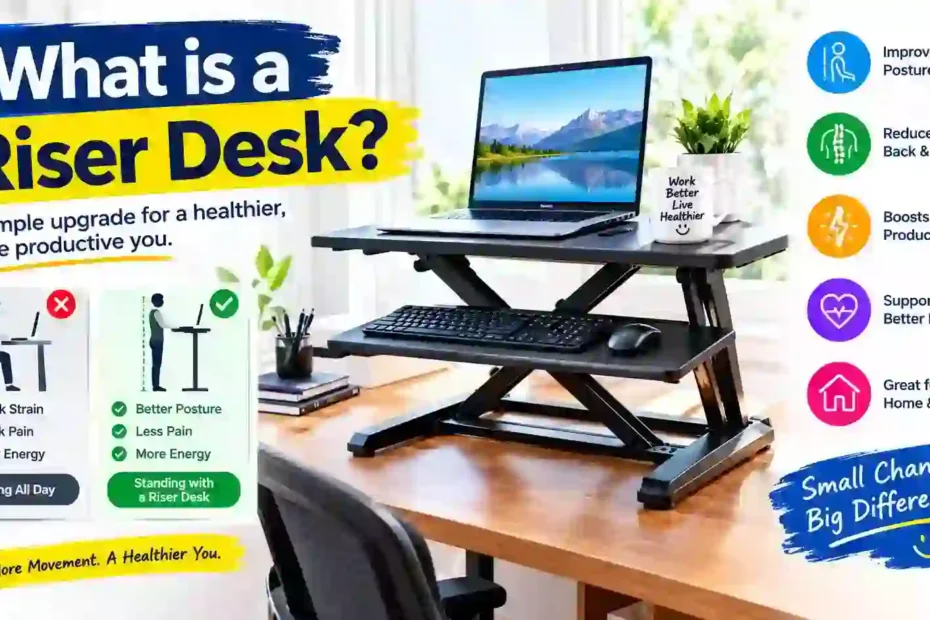
Picture a sturdy little shelf that parks itself right on top of your regular table. Now imagine that shelf can slide up and down like an elevator, carrying your laptop and monitor along for the ride. That is your riser desk in the simplest possible terms.
People throw around words like “sit-stand converter” and “height-adjustable workstation,” but strip away the marketing language and you are left with a metal-and-plastic platform that gives your existing desk a second life. You do not rip out your old furniture. You do not make holes in the wall. You just plop this thing down and suddenly you have the option to work on your feet whenever your body begs for it.
The magic lives inside a pair of gas-spring cylinders hidden in the frame. Squeeze the paddle on the side, push up or pull down, and the platform locks wherever you release it. Three seconds flat. No electricity needed on most models, no app to download, no Bluetooth pairing nightmare.
The Real Reason Everyone Started Talking About Riser Desks
Let me paint a scenario you probably recognize. You sit down at 9 AM feeling fine. By noon, you are slouching like a cooked noodle. By 4 PM, your hip flexors are so tight you walk funny for the first ten steps after standing up.
That pattern is not laziness. It is biology fighting against furniture. The human body evolved to move, squat, walk, and stand — not to fold itself into an L-shape for a third of its waking life. When you park your spine in a chair all day, the discs between your vertebrae compress unevenly, your glutes essentially fall asleep, and your shoulders creep toward your ears like they are trying to escape your torso.
A riser desk interrupts that slow-motion damage. You are not forced to stand for eight hours straight — nobody should do that, and anyone who tells you otherwise has never actually tried it. Instead, you bounce between sitting and standing throughout the day. Twenty minutes up, forty minutes down, repeat. That tiny rhythm keeps your blood moving, your joints lubricated, and your spine breathing the way it was built to.
Four Flavors of Riser Desks (And Which One Will Not Make You Regret Your Purchase)
Walk into any office supply store or scroll through Amazon and you will drown in options. I have tested enough of them to sort the genuinely useful ones from the overpriced paperweights.
The Straight-Up Lifter (Z-Frame): This style shoots vertically, like an elevator in a shaft. It does not creep forward as it rises, which matters enormously if your desk sits against a wall. The footprint stays tight. The trade-off? You sometimes sacrifice a few inches of maximum height compared to other designs.
The Scissor-Leg Lifter (X-Frame): As one of these rises, its legs will cross and spread outward, resembling an ironing board unfolding. That outward spread gives you a taller ceiling but eats into your desk depth. If your table is narrow — say, under 24 inches deep — this style will hang over the front edge and drive you nuts.
The Motorized Version: A tiny electric motor does the heavy lifting so your hands stay on the keyboard. You tap a button, the platform hums upward, and you keep typing mid-sentence. Sounds luxurious, and it is, but the motor adds weight, adds cost, and adds one more component that can eventually break. I only recommend this route if you switch positions more than a dozen times daily.
The Fixed Block (Not Really a Riser): Some products labeled as “monitor risers” are just static chunks of wood or plastic that prop your screen up by five inches. They help your neck angle but do absolutely nothing for standing. Do not let the similar name fool you — these are a completely different animal and will not solve the sitting problem.
The Posture Payoff Nobody Warns You About (It Is Not Instant)
Here is where I want to be brutally honest with you because most articles skip this part. The first week with a riser desk feels weird. Your calves ache. Your feet throb. You catch yourself leaning on the platform like a crutch, which defeats the entire point.
Push through that awkward phase and something shifts around week three. Your shoulders stop hiking up toward your ears. The dull knot between your shoulder blades starts to loosen. You realize at 6 PM that your lower back is not screaming the way it used to.
The mechanism behind this is straightforward. Standing opens the angle at your hips from roughly 90 degrees to about 170 degrees. The psoas muscle, a deep hip flexor that chronically shortens in desk workers and presses on the lumbar spine like a pulled bowstring, is released by just one adjustment. Once that tension eases, your entire posture chain realigns from the pelvis upward.
Do not expect miracles on day one. Expect real, noticeable relief by day twenty-one. That timeline is consistent across almost every person I have talked to who stuck with the habit.
Dialing in the Perfect Height (Most People Get This Dead Wrong)
I cannot stress this enough: a riser desk set at the wrong height is worse than no riser at all. Too tall and you will hike your shoulders all afternoon, creating the exact neck tension you were trying to eliminate. Too short and you will hunch over the keyboard like you are back in your original sitting position, just with sorer legs.
The golden checkpoint is your elbow angle. Stand tall, relax your shoulders completely — do not force them down, just let gravity do its thing — and bend your arms. Your forearms should float parallel to the floor with your elbows bent at roughly 90 degrees. That level is where the keyboard tray must land. Not two inches above, not two inches below. Right there.
For your screen, the top edge of the monitor should kiss your eyebrow line when you look straight ahead. If you have to tilt your chin up to read the menu bar, the screen is too high. It is too low if you are looking at the top of the browser.
Most adults between 5’5″ and 5’11” land somewhere in the 14-to-17-inch lift range above their desk surface. Before making a purchase, carefully consider the maximum height requirement if you are higher than 6’1″. Many low-cost versions have a tapout of about 15 inches, which will need you to kneel.
Stop Mistaking Riser Desks for Full Standing Desks
I see this mix-up everywhere and it leads to a lot of buyer’s remorse, so let me draw a sharp line between these two products.
Your entire table is replaced by a full standing desk. It has legs that telescope from sitting height all the way up to standing height, and it typically costs anywhere from three hundred to over a thousand dollars depending on the motor and build quality. It is a permanent furniture decision.
A riser desk sits on top of whatever table you already own. It is a modifier, not a replacement. You keep your current desk, your current monitor arm, your current cable routing — everything stays intact. You just gain the standing option layered on top.
| Comparison Point | Riser Desk (Converter) | Full Standing Desk |
| Money you will spend | Roughly $100 to $350 | Roughly $350 to $1,200 |
| Minutes to set up | Five, maybe ten | Forty-five to ninety |
| Does it replace your desk? | No, it rides on top | Yes, your old desk goes away |
| Can you move it easily? | Grab and go, under 30 lbs | Heavy, bolted, permanent |
| Height travel | 12 to 20 inches above desk | 25 to 50 inches from the floor |
| How much weight it holds | Usually 25 to 40 lbs | Often 150 to 300+ lbs |
| Ideal buyer | Renters, apartment dwellers, budget-conscious folks | Homeowners with dedicated office rooms |
| Motor availability | Optional, mostly manual | Almost always motorized |
If you love your current desk and just want the standing option without a renovation project, the riser wins every time. If you are building a workspace from zero and want maximum range, go full standing desk.
What Your Wallet Should Actually Expect to Spend
Let me save you the headache of browsing fifty product pages. The riser desk market in 2025 breaks down into three clear price buckets, and each one gets you a very different experience.
The “I Just Want to Try It” Tier ($80 to $140): You will find manual X-frame and Z-frame converters from brands like VIVO and FlexiSpot in this zone. They work. At full height, they sway slightly. The keyboard tray feels slightly flimsy. However, this tier allows you to test the waters without making a significant financial commitment if you are unsure if standing will become a daily habit.
The Sweet Spot ($150 to $290): This is where the build quality jumps noticeably. Heavier steel frames, smoother gas springs, wider surfaces that actually fit two monitors without feeling cramped. The Varidesk Pro Plus 36 and the Ergotron WorkFit-D live here, and they are the models I point most people toward.
The “I Want It to Feel Permanent” Tier ($300 to $500): Electric motors, programmable height presets, integrated cable channels, and surfaces wide enough for a triple-monitor setup. These converters feel less like accessories and more like genuine desk upgrades. Worth it if you know you will stand multiple times every single workday for years to come.
One warning I will repeat until it sticks: anything priced below $70 is a trap. The gas springs die within months, the platform tilts under the weight of a standard monitor, and you end up buying a second unit anyway. Cheap riser desks are the most expensive riser desks you can buy.
The Feature Checklist I Wish I Had Before My First Purchase
Knowing what is a riser desk in theory is one thing. Walking into a store or opening a browser tab with the right filter criteria is another. These are the six specs I now check before recommending any model to anyone:
- Surface real estate: Grab a tape measure and check your monitor width. A single 27-inch screen demands at least 32 inches of platform width. Dual screens need 36 inches minimum, and I would push for 40 if your desk can handle it.
- Keyboard tray dimensions: This is the most overlooked spec and the one that causes the most daily annoyance. Your keyboard and mouse need to sit side by side with at least three inches of breathing room on the mouse side. Countless budget models cram the mouse right off the edge.
- Weight ceiling: Weigh your monitor, your laptop, your speakers, and whatever else you plan to put on the platform. Then add ten pounds as a buffer. The gas springs will sag in a few of weeks if the sum surpasses the riser’s rated capacity.
- Maximum lift height: Cross-reference this number with your own standing elbow height. If the riser maxes out at 14 inches and you need 18, you will spend every standing session hunched forward, which is the exact opposite of the goal.
- Wobble factor at full extension: Read the one-star and two-star reviews specifically. Search for the word “shake” or “wobble.” If multiple buyers mention the platform vibrating every time they hit the spacebar, walk away.
- Out-of-the-box readiness: The best converters arrive fully assembled. You slice the tape, lift the unit onto your desk, and start working. If the listing mentions “some assembly required,” budget an extra twenty minutes and a Phillips screwdriver.
A Setup Walkthrough That Takes Ten Minutes and Saves You Months of Pain
Unboxing is the easy part. Positioning the riser correctly is where most people fumble, and the consequences show up as neck stiffness within the first week.
Park it against the back edge. Push the riser all the way to the rear of your desk, ideally flush against the wall. This keeps your monitor at a comfortable arm’s length and prevents the platform from creeping forward when you lean on it.
Lock in your standing height first. Raise the platform, stand up straight, and adjust until your elbows hit that 90-degree sweet spot I described earlier. Do this before you place any equipment on top so you are not fighting the weight of your monitor while tweaking the height.
Eye-level the screen. Sit down, then stand up, and check the monitor position from both postures. The top of the display should align with your brow line when standing and sit slightly above eye level when sitting. If the gap between the two positions is too large, tilt the monitor backward a few degrees to split the difference.
Flatten your wrists. Place your keyboard on the tray and type a few sentences. Your wrists should float straight and neutral, not bent upward like you are revving a motorcycle. If they angle up, the tray is too high — lower it or raise the main platform slightly.
Put something soft under your feet. This is the single biggest comfort upgrade you can make, and it costs about twenty dollars. An anti-fatigue mat — basically a thick foam pad — absorbs the pressure on your heels and the balls of your feet. Standing on bare hardwood or tile for an hour feels punishing. Standing on a cushioned mat for the same duration feels surprisingly pleasant.
The Productivity Angle That Skeptics Always Ignore
I used to roll my eyes at the “standing makes you more productive” claim. It sounded like marketing fluff cooked up by companies trying to sell overpriced furniture. Then I actually tracked my own output for a month.
The difference was not dramatic in the first week, but by week three I noticed something specific: my 2 PM to 4 PM window — the graveyard shift where I used to stare blankly at spreadsheets — suddenly had teeth again. When I stood up around 1:45 and stayed on my feet for thirty minutes, my brain seemed to wake back up. Tasks that normally dragged took noticeably less time.
The science backs this up, though the mechanism is simpler than most studies make it sound. Standing raises your heart rate by roughly ten to fifteen beats per minute compared to sitting. That modest bump pushes a little extra oxygenated blood to your brain, which sharpens attention and speeds up cognitive processing. You are not running a marathon; you are just keeping the engine idling slightly higher.
The critical caveat: standing all day destroys productivity just as effectively as sitting all day. Foot pain and leg fatigue will scatter your focus faster than a Slack notification. The rhythm that works for most people is roughly twenty to thirty minutes standing for every forty to sixty minutes sitting. Your riser desk makes that toggle effortless, which is the whole point.
Five Rookie Mistakes That Will Make You Hate Your Riser Desk Within a Week
I have watched friends and coworkers buy perfectly good riser desks and then shove them into a closet after ten days because they “did not work.” In almost every case, the problem was not the product. It was one of these blunders:
Going full standing on Monday morning. Your body has spent years adapting to a chair. Yanking it into eight hours of standing is like running a marathon without training. Start with fifteen-minute standing blocks, twice a day, and add five minutes each week. By week four you will comfortably handle thirty to forty-five minutes at a stretch.
Obsessing over monitor height while ignoring the keyboard tray. Your neck gets the attention, but your wrists absorb the real punishment. Carpal tunnel does not care how perfectly your screen is positioned if your hands are bent at a forty-five-degree angle on a cramped tray.
Mounting the riser on a wobbly desk. If your base table already shakes when you type aggressively, the riser will amplify that vibration like a speaker cone. Tighten the desk legs, add cross-braces, or move the riser to a sturdier surface before you blame the converter.
Never readjusting between tasks. Typing an email, reading a long document, and joining a video call all demand slightly different screen distances and angles. Make it a habit to adjust the height every time you switch tasks for five seconds. Your eyes and neck will reward you.
Skipping the floor mat. I mentioned this earlier and I will mention it again because it is that important. Standing on a hard surface without cushioning is the number one reason people quit standing within the first two weeks. A twenty-dollar foam mat is the cheapest insurance policy you will ever buy for your new habit.
The Bottom Line for Anyone Working From Home More Than Twice a Week
If your kitchen table, your bedroom dresser, or your hand-me-down IKEA desk doubles as your office five days a week, a riser desk is the most practical upgrade you can make without rearranging your entire living space. It respects the furniture you already own, it respects your budget, and it respects the fact that your body was not built to stay folded in half from nine to five.
Think about the cost in a different light. A decent mid-range converter runs about two hundred dollars. A single session with a physical therapist for chronic lower-back pain runs anywhere from eighty to two hundred dollars depending on where you live. If the riser saves you even two or three appointments over the next twelve months, it has already paid for itself — and your back will feel the difference long before your wallet does.
The energy shift is the part that catches people off guard. Less stiffness at the end of the workday means you actually have fuel left for the evening. You cook dinner instead of ordering takeout. You play with your kids instead of collapsing on the couch. You go for a walk instead of scrolling your phone in a fog. That ripple effect is impossible to put a price tag on, and it starts with a simple platform that lifts your screen a few inches off the table.
Stop Reading and Go Measure Your Desk
You now understand what is a riser desk from every angle that matters — the mechanics, the health logic, the real costs, the setup nuances, and the traps that trip up first-time buyers. The only step left is the physical one.
Grab a tape measure this weekend. Check your desk depth, your monitor width, and your standing elbow height. Compare those numbers against the specs of two or three models in your budget range. Order the one that fits your actual body, not the one with the flashiest product photos.
Your spine has been quietly begging for this change for months, maybe years. Give it the relief it deserves. Stand up, lift your workspace, and notice how different 5 PM feels when your body is not screaming at you.